MuniciPay makes it easy to share a direct payment option with your customers. Each public department can provide a **shareable payment page link** and a **downloadable QR code**, giving payers a quick and convenient way to access the appropriate payment page.
The payment link can be shared electronically, while the QR code can be added to printed materials, notices, flyers, mailings, or other marketing collateral.
How to Access the Payment Link and QR Code
Log in to your **MuniciPay** account.
Select "Settings". Choose "Manage Departments and Items" from dropdown menu.
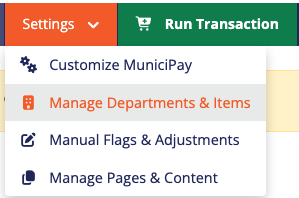
Locate the department you would like to share. Click the **three dots** located to the right of the department. Select "Share Item".

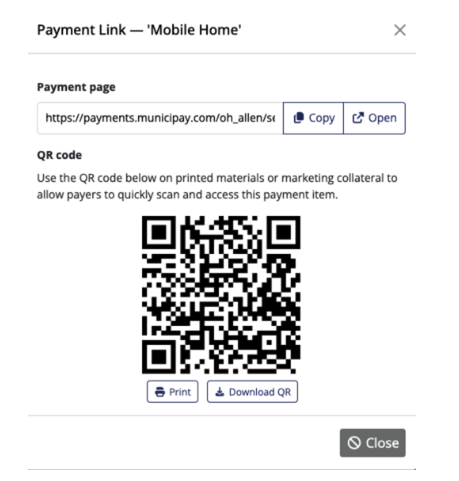
A Share Payment Link window will display with:
* A **copyable payment page URL**
* A **downloadable QR code**
Using the Payment Link
Copy the payment page link and use it anywhere you would like to direct customers to that specific MuniciPay payment page.
For example, you can include the link in:
* Emails
* Your website
* Social media posts
* Electronic notices
* Customer communications
Using the QR Code
Download the QR code and add it to printed or digital materials. Customers can simply scan the code with their mobile device to quickly access the corresponding payment page.
The QR code can be especially useful on:
* Tax or utility notices
* Statements or invoices
* Flyers
* Posters and signage
* Mailers
* Office handouts
* Marketing materials
Make It Easier for Customers to Pay
Using a direct payment link or QR code eliminates the need for customers to navigate through multiple pages to locate the correct payment item. With one click or scan, they can be taken directly to the appropriate MuniciPay payment page and begin their payment.
Was this article helpful?
That’s Great!
Thank you for your feedback
Sorry! We couldn't be helpful
Thank you for your feedback
Feedback sent
We appreciate your effort and will try to fix the article