Who is Autoagent?
Since 2001, Autoagent has been transforming government payments from a necessary chore into a seamless civic interaction.
Autoagent’s dedicated payment gateway, MuniciPay, is built with the latest security and technologies required to protect against modern security risks that have become too significant to ignore. This will enhance both security and efficiency for your ACH payments.
Why do we need to move off Muni-Link’s ACH platform?
For more than ten years, Muni-Link has been processing ACH transactions for a limited number
of customers. When the ACH processing started, cybersecurity risks and costs were low. As payment regulations, security standards, and risk requirements evolve, many software providers, including Muni-Link, are moving away from directly supporting ACH processing.
Autoagent specializes exclusively in electronic payments and compliance. This transition ensures your ACH payments are:
- Fully compliant with NACHA rules
- Actively monitored for fraud and returns
- Properly supported by a dedicated payments team
- Scalable and sustainable long-term
This change allows Muni-Link to focus on software functionality, while Autoagent focuses on secure, reliable payment processing through MuniciPay. Click here to visit the Autoagent Trust Center, which gives an overview of our dedication to compliance and other accreditations.
Why does MuniciPay’s ACH platform have a cost when our previous solution was free?
While your previous ACH platform may have appeared “free,” ACH processing always carries underlying costs related to:
- Bank and network fees
- Compliance and risk management
- Fraud monitoring and return handling
- Ongoing system maintenance and reporting
Muni-Link was covering these costs, but as payment regulations, security standards, and risk requirements evolve, many software providers are moving away from directly supporting ACH processing due to increased costs.
What happens if we don’t move to MuniciPay’s ACH platform?
Muni-Link is discontinuing ACH support later this year and is working to transition all customers to MuniciPay. Continuing with the existing ACH solution is not possible. Muni-Link can answer any questions you may have about how long the existing ACH program will be supported.
What new value does MuniciPay provide?
- Your payers will be able to securely setup recurring billing using both ACH and credit card.
- Manage all payment activity—credit cards, debit cards, and ACH—in a single, centralized platform.
- Your payers will receive consistent communication and payment receipts from a single platform.
- NACHA compliance management
- Proactive fraud detection and monitoring
- Dedicated payment support and escalation paths
- Clear reporting and reconciliation tools
- Defined return and exception handling processes
- Direct relationship with the payment processor and financial institutions
This level of oversight and accountability is critical for utilities handling public funds.
What about our existing payers enrolled in autopay?
Autoagent and Muni-Link will be securely migrating all existing enrollments in autopay to MuniciPay. Payers will be informed of the changes by e-mail prior to the transition and given the opportunity to make changes if needed. They will also be able to switch their payment method to credit if they would prefer to do so.
What is the cost of the Service Fee for our payers?
$1.50 per electronic check payment
Is ACH still more cost-effective than card payments?
ACH remains more cost-effective than credit and debit card payments for most utilities when the average utility bill is over $60.
Autoagent will work closely with Muni-Link to minimize disruption and maintain a familiar experience for payers.
How does MuniciPay handle ACH returns and exceptions?
MuniciPay provides ongoing monitoring of ACH returns and rejected entries, including clear reporting of return reasons. Your office will receive an email notification containing any returned transactions from no-reply@municipay.com. Your payers will also be notified that their payment was returned.
Return details will also be included in your daily summary report from MuniciPay, provided this email notification setting is enabled for your account.
If you do not currently have daily summary emails enabled and would like to activate them, please contact support@municipay.com for assistance.
What support will we receive during and after the transition?
Autoagent will offer guided onboarding and setup for the ACH transition, as well as coordination with the Muni-Link team to ensure this transition is as smooth and transparent as possible. Both teams are available as needed to address any concerns or questions that may arise:
- If you have questions about pricing, setup, or timing, please contact:
- Scott Williams with Autoagent - scottw@autoagent.com | 717-891-9642
- Chad Legros with Muni-Link – clegros@Muni-Link.com | 814-499-6034
- If you have questions about the system once you have completed onboarding, please contact: support@municipay.com
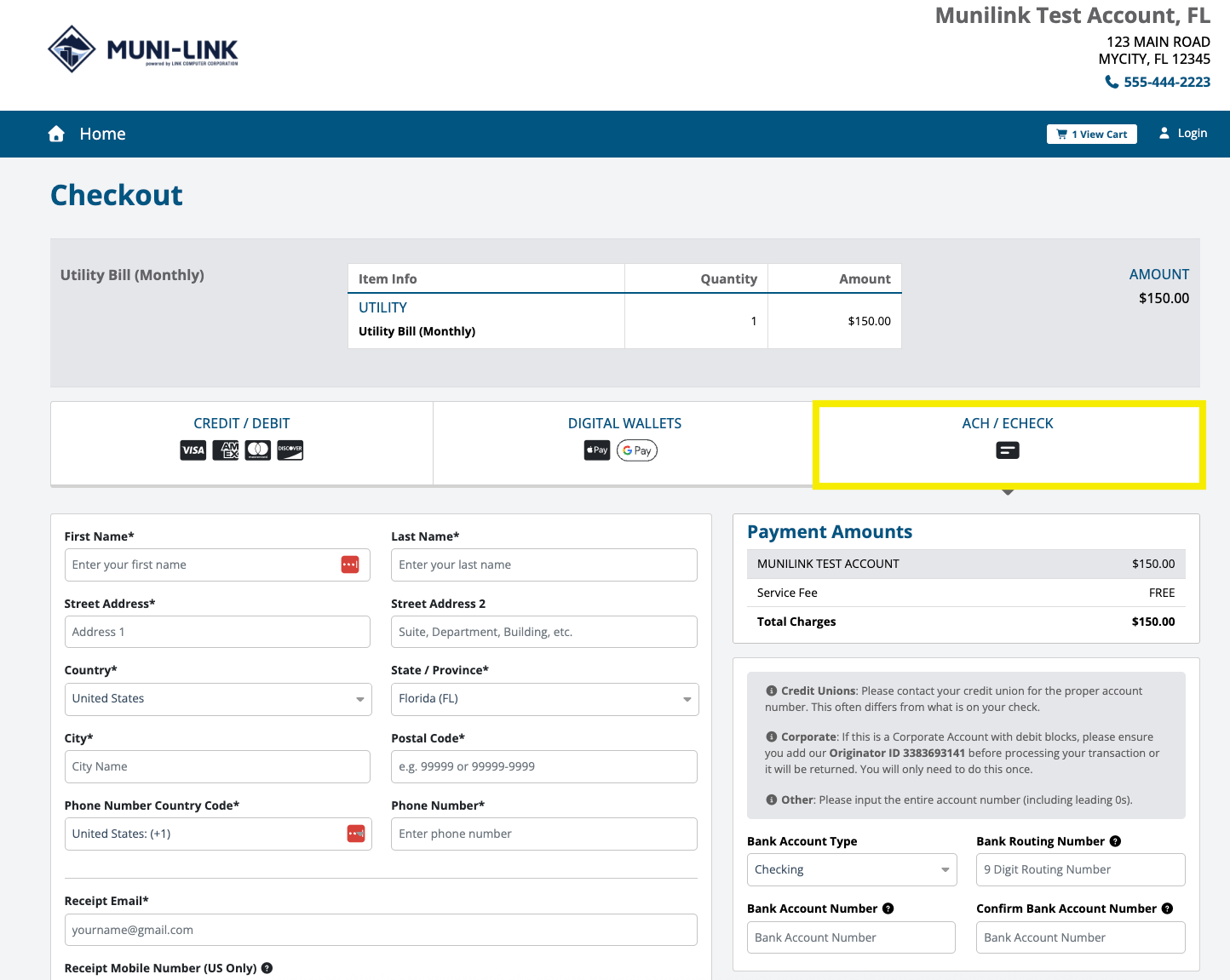
How will the user experience change?
After ACH is enabled in your MuniciPay account, a selectable ACH payment option will be available in the shopping cart for constituents, as pictured below.
What do I need to do to get started?
If you do not have any questions for Chad or Scott, you may use the links below to complete the application. Please note, as part of the application, you will be required to upload a voided check.
Instructions to help simplify the “CHECK INFORMATION” section of the application:

- The “Maximum Check/ACH Amount Requested” field is the largest single payment you anticipate receiving. Example: If the highest payment you expect is $5,000, enter $5,000.
- If your highest check amount exceeds $25,000, we will need three (3) months of bank statements.
- If your highest check amount exceeds $100,000, we will need three (3) months of bank statements and two (2) years of financial statements.
- The “Estimated Monthly Check/ACH Volume” field is the total dollar amount you expect to process in ACH payments each month. Example: If you process 20 checks per month at an average of $50 each, enter $1,000.
Please select the appropriate application link below based on your pricing model:
- Click Here if you charge Service Fees to your utility payers
- Click Here if you absorb the costs associated with credit card acceptance for your utility payers
Was this article helpful?
That’s Great!
Thank you for your feedback
Sorry! We couldn't be helpful
Thank you for your feedback
Feedback sent
We appreciate your effort and will try to fix the article