MuniciPay allows government agencies to upload parcel bills in bulk using a "ZIP file", making it easier to manage large volumes of bill presentment data at once.
The bulk upload process includes built-in file-size controls, ZIP-file security protections, and clear error reporting for any files that cannot be processed. Successfully matched bills will appear with the related item on the "MuniciPay Item Overview" page.
Important Information: In order to utilize this tool, your office must:
- have billing data uploaded through Autoagent
- have the Item Pages enabled on MuniciPay
- ensure we have # of installments set up properly
How to Upload a Bulk Bill File
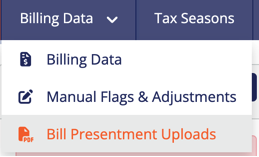
Log in to your account. Click the "Billing Data" tab. From the drop-down menu, select "Bill Presentment Uploads".
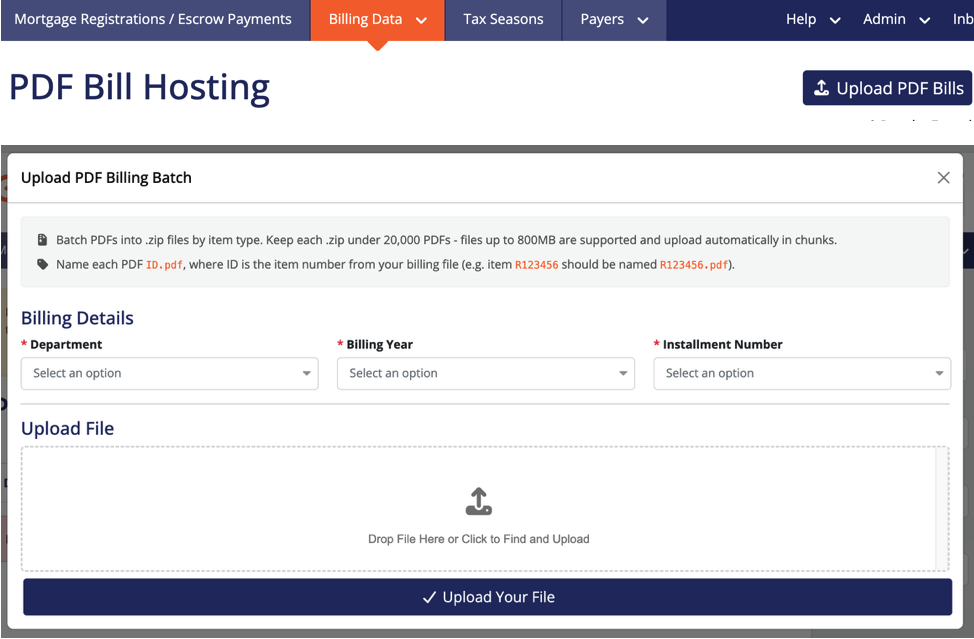
Select the appropriate "Department".
Choose the "Billing Year".
Select the applicable "Installment Number".
Before uploading your ZIP file, please review the instructions displayed on the screen. These instructions provide important requirements for preparing and naming your PDF files and ZIP folders to ensure they upload successfully.
Once you have reviewed the on screen instructions, add your zip file by either:
- Dragging and dropping the file into the upload area, or
- Clicking the upload area to browse and select the file from your computer.
Once your file has been selected, click "Upload Your File".
What Happens After Upload
MuniciPay will process the ZIP file and attempt to match each bill to the appropriate item.
Successfully matched bills will then appear with the related item on the "Item Overview" page, allowing users to quickly access the corresponding bill.
If a file cannot be processed, MuniciPay will provide clear error information so you can identify and correct the issue.
Reviewing Previous Uploads
Bill Presentment Uploads can be filtered to help you quickly locate and review previous submissions.
Available filters include:
- Department
- Date Range
- Status
These filters make it easier to track uploads, confirm processing status, and identify files that may require attention.
Built-In File Protection
The bulk upload process also includes safeguards designed to protect the system and improve reliability, including:
- File-size controls
- ZIP-file security protections
- Error reporting for files that cannot be processed
- Automatic cleanup of temporary upload files
Bulk Bill Presentment Uploads provide a faster and more efficient way to make parcel bills available through MuniciPay while keeping the upload process organized and easy to manage.
Was this article helpful?
That’s Great!
Thank you for your feedback
Sorry! We couldn't be helpful
Thank you for your feedback
Feedback sent
We appreciate your effort and will try to fix the article